



Table of contents
Etsy reported 87.3 million active buyers as of Q2 2025, and a growing share of them search specifically for digital downloads. Sellers pay no shipping costs, hold no inventory, and can keep listings live around the clock.
This guide explains how to sell digital products on Etsy from scratch. You’ll learn what to sell, how to create your products, how to set up your own Etsy shop, and how to improve your visibility in search results.
What are digital products on Etsy?
Digital products on Etsy are downloadable files delivered instantly after purchase – no physical shipment involved. Etsy allows up to five files per listing, with a maximum file size of 20 MB each. Supported formats include PDF, PNG, JPG, SVG, ZIP, MP3, and MP4.
Instant downloads vs made-to-order digital products
Most Etsy sellers use instant delivery. After a purchase, Etsy automatically sends the buyer a download link with no action required from the seller. This is the default setup for selling digital downloads on Etsy.
Made-to-order digital products require a more hands-on approach. After receiving an order, the seller customizes the file – for example, adding a name to a wedding invitation – and manually delivers it to the buyer. Because these products are personalized, sellers can often charge a higher price.

Source: The CrownPrints
What counts as a digital product on Etsy?
Etsy's digital product category includes printables, templates, digital art, SVG cut files, fonts, spreadsheets, educational resources, patterns, and audio files. If a customer can download and use the file without receiving a physical item, it qualifies as a digital product.
Why sell digital products on Etsy?
Benefits of selling digital products on Etsy
Zero inventory and no shipping. Digital products require no storage, packaging, or shipping. They also eliminate the time spent fulfilling individual orders. Once uploaded, Etsy automatically delivers every sale.
Passive income at scale. A single digital file can be sold repeatedly without additional production costs. A well-optimized listing can generate ongoing revenue on the side or serve as the foundation of a full-time Etsy business.
Low startup costs. Getting started requires little upfront investment. Create an Etsy account, choose a design tool such as Adobe Illustrator, Canva, GIMP, or Inkscape, and publish your first listing. Etsy charges $0.20 per listing, with no minimum order quantities or supplier relationships to manage.
A natural add-on to physical products. If you already sell physical goods, digital downloads can increase the value of each sale. Examples include printable care instructions, matching templates, or downloadable pattern files – none of which add fulfillment work.
Limitations and things to watch out for
Competition in popular niches. High-demand categories like wedding printables and social media templates attract thousands of sellers. Standing out requires a clear niche, high-quality designs, and strong SEO.
Copyright and licensing risks. Using trademarked characters, unlicensed fonts, or branded content without permission can lead to listing removals or even shop suspension. Make sure every asset in your digital files is either original or properly licensed for commercial use.
Ongoing customer support. Digital products still need support. Buyers may need help opening files, troubleshooting software compatibility issues, or resolving concerns about the product description.
Turnaround expectations for custom orders. Buyers expect personalized files to be delivered quickly. Delays can lead to negative reviews and may impact your shop's visibility.
Etsy fees for digital products explained
Etsy applies the same fee structure to digital and physical products:
-
Listing fee: $0.20 per listing, charged when published and each time a sold listing renews.
-
Transaction fee: 6.5% of the item price. Since digital products don't include shipping, this applies only to the sale price.
-
Payment processing fee: For US sellers, 3% + $0.25 per transaction. Fees vary by country; in many EU markets, sellers pay around 4% + €0.30.
-
Offsite Ads fee: 15% on sales generated through Etsy's external ads. The fee drops to 12% once your shop earns more than $10,000 in the previous 12 months. Sellers below that threshold can opt out; participation is mandatory above it.
For a $10 digital download sold in the US, mandatory Etsy fees total about $1.22 before any Offsite Ads charges.
Best digital products to sell on Etsy in 2026
Printables and planners

Printable Mandala coloring page. Source: OvertureDigital
Printable planners, wall art, budget trackers, and calendars are among Etsy’s most popular digital products. Buyers can download and print them at home without any special software.
If you want to sell digital planners specifically, this is one of the most-searched subcategories on Etsy. They can be especially appealing for creative sellers, as visual style often matters more than in highly commoditized niches. Other printable categories with steady demand include homeschool materials, fitness trackers, meal planners, and party decor.
Templates (Canva, Google Docs, Notion)

Source: EditingStudio
Editable templates attract buyers who want polished designs without having to create them from scratch. Canva templates for resumes, social media posts, presentations, and business cards are especially popular.
Google Docs and Notion templates cater to the productivity market. Sellers deliver a shareable Canva link or a file that buyers can import directly.
Specificity drives sales here – a listing titled "Real estate agent business card template for Canva" targets a clear audience, while a generic "Business card template" competes with thousands of similar listings.
Digital art and wall art

Source: NorthPrints
Downloadable wall art and artwork perform best when they target a specific style or space. Buyers often search for printable art by aesthetic (minimalist, botanical, abstract), color palette, or room type (nursery, home office, kitchen). Shops like NorthPrints show how a large catalog of digital art files can attract consistent demand.
Resolution and file formats matter. Include multiple sizes (4×6, 5×7, 8×10, A4, A3) in a single listing so buyers can print artwork to fit different frames.
SVG cut files and clipart
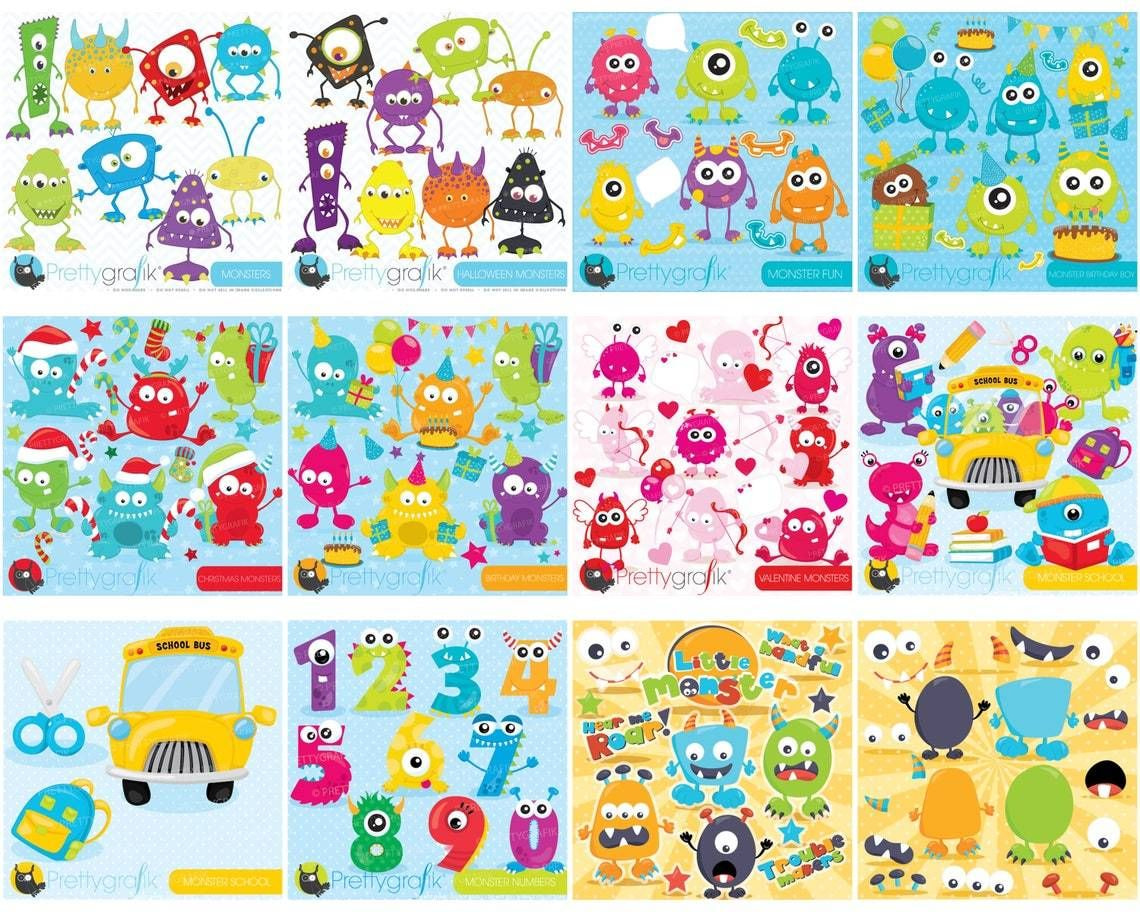
Source: PrettyBundle
Cricut and Silhouette machine users are among the most active buying communities on Etsy, with SVG cut files leading the category. These files are commonly used for vinyl decals, heat-transfer designs, and paper crafts. PNG clipart bundles are also popular among digital scrapbookers and designers.
This niche rewards volume – sellers who create large themed bundles (holiday SVG sets, floral clipart collections) can encourage repeat purchases from buyers returning for matching designs.
Educational resources and eBooks
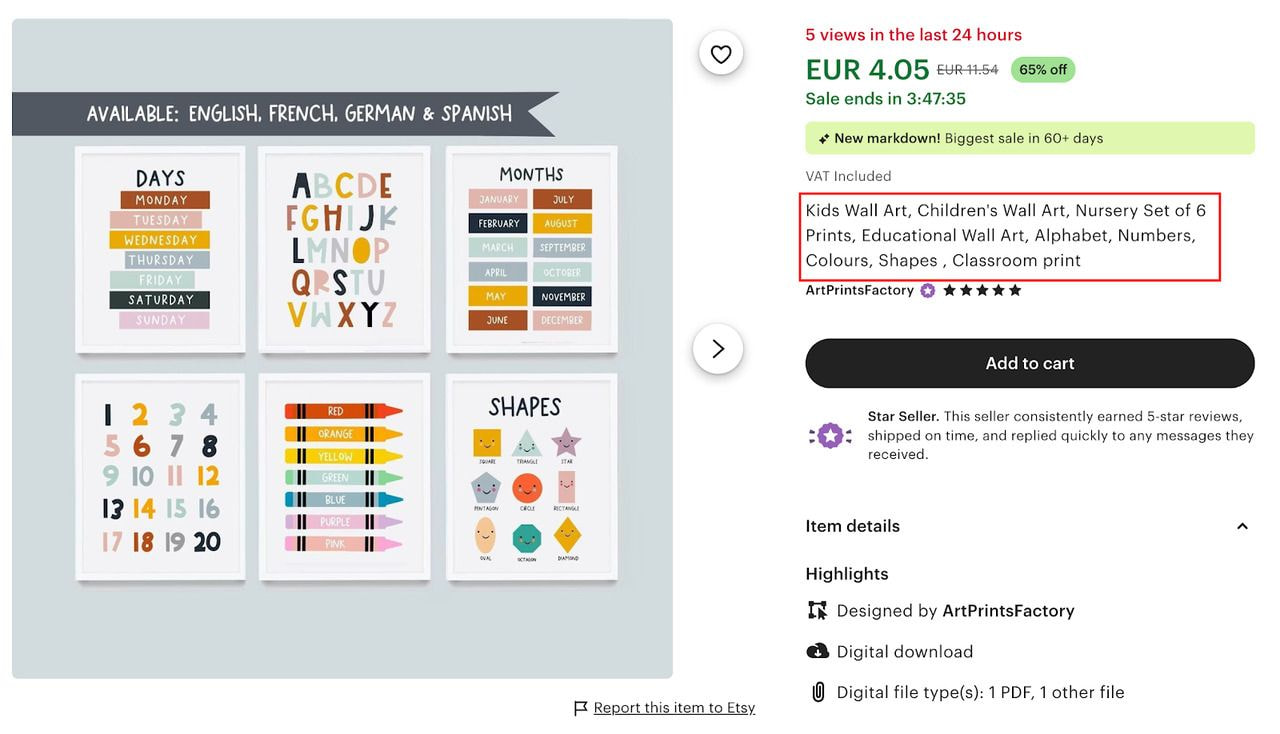
Source: ArtPrintsFactory
Expertise in a skill or subject can be turned into sellable digital assets. Etsy buyers purchase crochet patterns, knitting charts, language worksheets, photography guides, and business templates.
For example, the Crocheniacs store offers a large collection of crochet patterns that include photo instructions and links to YouTube tutorials. Each pattern works as a standalone product while helping drive interest in other listings.
eBooks and online courses in PDF format work well here. Keep them focused – a concise guide on a specific technique often provides more value than a broad one.
Spreadsheets and trackers
Budget trackers, expense logs, wedding planners, and project management spreadsheets sell consistently because buyers see immediate functional value. Google Sheets templates work particularly well since buyers access them across devices without purchasing additional software.
Price this category based on complexity. A simple monthly budget tracker might list for $3-$7. A detailed small business bookkeeping spreadsheet with formulas, categories, and instructions can justify $15-$30.
Fonts and design assets

Source: KAFontDesigns
Commercial-use fonts, logo templates, icon packs, and branding kits attract designers, small business owners, and content creators. KAFontDesigns built one of Etsy's largest font and design asset catalogs on this model.
License clarity is critical in this category. Buyers need to know exactly what they can do with the files – personal use only, small-business commercial use, or an extended commercial license. Offer tiered licensing if possible.
How to find what's in demand (market research)
Before creating a product, confirm that potential customers are actively searching for it. Skipping this step can lead to hours spent creating products that generate little or no traffic. Conduct market research as soon as you have an idea, before investing time in production.
Start with Etsy search
Enter your product idea into the Etsy search bar and review the autocomplete suggestions, which reflect common buyer searches. Then review the top-ranking listings for your keyword, paying attention to pricing, number of reviews, and sales activity. A listing with thousands of reviews in a specific sub-niche confirms buyer demand.
Check Etsy's search filters
Use the "Most recent" filter to see whether other sellers actively list in that category. High listing volume paired with high review counts signals healthy demand. Reading customer reviews can also reveal common requests and unmet needs that may inspire new product ideas.
Use third-party tools
Marmalead and eRank pull data directly from Etsy's search volume and competition scores. Both show which keywords drive traffic, how competitive each term is, and what related terms buyers use.
Look at Google Trends
Use Google Trends to see whether interest in a product is growing, stable, or declining. Seasonal products (Christmas printables, Valentine's Day templates) show predictable spikes that you can plan inventory and listings around.
Aim for niches where search volume is strong and the first page of results doesn’t consist entirely of shops with thousands of reviews. Entry points exist even in competitive categories when you target a more specific variation of a popular product.
How to make digital products to sell on Etsy
How to make printables to sell on Etsy
Printables typically use standard paper sizes: US Letter (8.5×11 inches), A4, or common photo sizes (4×6, 5×7). Design at 300 DPI to ensure sharp printed output. Export as PDF for printables that buyers print at home, or as high-resolution PNG if they might use a printing service.
Canva works for most printable styles. Adobe Illustrator gives finer control over vector elements and is the standard for professional-grade work. Keep your design grid consistent across a product line so buyers who purchase multiple items receive a cohesive set.
How to make Canva templates to sell on Etsy
Build your template in Canva, then share it as a Canva template link (not a downloaded file). Buyers click the link, create a copy in their own Canva account, and edit it directly. Include the link in a PDF instruction document that you upload as the listing file.
Only use Canva's brand fonts and free elements, or purchase elements with a commercial license. Canva Pro elements include commercial use rights; free-plan elements don’t.
How to make digital art to sell on Etsy
Digital art for Etsy printables requires a minimum of 300 DPI at the intended print size. Adobe Illustrator and Procreate are the standard tools. Vector files (AI, EPS) scale to any size without quality loss, making them ideal for wall art sold in multiple dimensions.
For photography-based art or illustrations, export as a high-resolution TIFF or PNG. Compress with a ZIP file if your listing includes multiple sizes, since Etsy's 20 MB per-file limit applies per uploaded file.
How to make SVG files to sell on Etsy
Create SVG files in Adobe Illustrator or Inkscape. Use clean, simplified paths, as complex anchor points increase file size and cause issues with cutting machines. Test every SVG in Cricut Design Space and Silhouette Studio before listing, since display behavior differs between platforms.
Organize your SVG files with clearly named layers. Buyers using cutting software expect elements to be grouped logically (e.g., separate layers for each color in a multi-color design).
File formats and technical requirements per product type
|
Product type |
Recommended format |
Resolution/spec |
|
Printables, planners |
|
300 DPI, CMYK color |
|
Digital wall art |
PDF, PNG, JPG |
300 DPI minimum |
|
Canva templates |
PDF (with Canva link) |
Template link delivery |
|
SVG cut files |
SVG, ZIP |
Clean paths, tested in Cricut/Silhouette |
|
Fonts |
OTF, TTF, ZIP |
Include license file |
|
Spreadsheets |
Google Sheets link, XLSX |
Include instructions PDF |
|
eBooks, guides |
|
Embedded fonts, hyperlinked TOC |
Best tools for creating digital products for Etsy
Free tools for beginners
Canva (free plan) covers most template, printable, and social media design needs. The free plan includes hundreds of fonts and design elements, with limitations on premium assets.
Inkscape is a free, open-source vector editor and a viable alternative to Adobe Illustrator for SVG files and vector-based printables.
Google Slides and Google Docs work for creating simple presentation templates and document templates that buyers access via a shared link.
GIMP handles photo editing and raster-based digital art at no cost.
Paid tools worth investing in
Adobe Illustrator ($22.99/month as a standalone app) is the industry standard for SVG files, fonts, vector art, and professional-grade printables. The learning curve is steeper than Canva, with a significantly higher output quality ceiling.
Canva Pro ($15/month) removes the free plan's content restrictions, adds a brand kit, and unlocks the background remover – a useful feature for creating mockups.
Procreate ($12.99 one-time purchase on iPad) dominates digital illustration. Sellers who create hand-drawn clip art, digital art prints, and illustrated planners use it as their primary tool.
AI tools for creating digital products faster
AI tools now play a direct role in Etsy product creation. The most practical applications:
Midjourney and Adobe Firefly generate base imagery for digital art prints and clipart. Use them as a starting layer, then refine in Illustrator or Photoshop. Always verify that your AI tool's terms of service allow commercial use of outputs.
ChatGPT and Claude draft eBook copy, worksheet prompts, planner page titles, and product descriptions faster than starting from a blank document.
Canva's AI features (Magic Write, Magic Design) accelerate template creation within the Canva environment.
Important
Etsy's policy requires that AI-assisted products disclose AI involvement, so check Etsy's current guidelines on AI-generated content before you publish a listing. Complete that disclosure step in the listing form, not just in your shop policies.
How to set up an Etsy shop for digital products
Step 1 – Create your Etsy account
Go to Etsy and sign up for a free account by clicking Sign in, then Register. Complete email verification. To open a shop, click your account icon and select Sell on Etsy, then Open your Etsy shop.
Step 2 – Name your shop and complete your profile
Choose a shop name that reflects your product category and is easy to search. Etsy allows one free name change after setup, so consider your niche direction before committing. Complete your shop bio, add a profile photo or logo, and write a brief About section.
Buyers use the About section to evaluate credibility, and shops with complete profiles convert at higher rates.
Step 3 – Set your shop policies for digital goods
Digital products require specific policy language. Address these points explicitly:
-
Refund policy: Etsy allows sellers to set their own refund terms for digital items. Most digital sellers offer no refunds due to the non-returnable nature of files, but consider offering replacements or support for technical issues.
-
Usage rights: State clearly whether files are for personal use, small commercial use, or extended commercial use. This prevents disputes and protects your intellectual property.
-
Customization terms: If you offer made-to-order files, specify turnaround time and what information buyers must provide.
Step 4 – Connect payment and billing
Etsy Payments is the standard payment processor and is mandatory in most countries. Connect your bank account in Shop Manager → Finances → Payment account. Etsy deposits earnings on a set schedule – daily, weekly, biweekly, or monthly – your choice after the initial holding period. Set up Etsy fees billing separately in Finances → Billing.
Once your shop is live and your first listing is ready, you’re selling.
Tip
For a detailed walkthrough of the full Etsy setup process, including tips specific to print-on-demand sellers, see How to sell Printful products on Etsy.
Etsy SEO for digital products
How Etsy search works
Etsy's search algorithm ranks listings based on relevance and listing quality. Relevance measures how closely your title, tags, and description match a buyer's search query. Listing quality reflects performance signals: click-through rate, conversion rate, and recency of sales.
New listings receive a temporary ranking boost as Etsy surfaces them to collect initial performance data. Strong early clicks and conversions sustain that position; weak performance causes the listing to drop. This means your listing images and title carry outsized importance in the first few weeks.
Keyword research for digital products (tools and process)
The goal of keyword research is to find the exact terms buyers type into Etsy search.
Etsy search bar: Type your product name and record the autocomplete suggestions. These are real search queries. Note which ones are specific (e.g., "minimalist wall art printable black and white") versus broad (e.g., "wall art").
eRank and Marmalead: Both tools show search volume, competition, and click-through rates for Etsy-specific keywords. eRank's free plan provides enough data for initial research.
Google Keyword Planner: Shows broader search volume trends. Useful for validating whether a topic has search interest outside Etsy, which can inform whether Google traffic is a realistic secondary channel for your listing.
Build a keyword list of one primary keyword, three to five secondary keywords, and a set of long-tail phrases – then map each to your titles, tags, and description.
How to write Etsy titles for digital products
Etsy titles allow up to 140 characters. Place your primary keyword near the beginning of the title, as Etsy gives more weight to the first words. Write in natural language rather than as a list of keywords.
Example structure: [Primary keyword] – [Secondary descriptor] – [Format or use case] – [Style or niche]
Digital planner 2026 – weekly planner printable – A4 and US Letter PDF – minimalist layout
Avoid excessive punctuation, all-caps, or keyword stuffing. Etsy penalizes listings that read as spam.
How to use all 13 tags effectively
Each listing supports 13 tags of up to 20 characters each. Use all 13. Distribute your keyword set across them:
-
Use your primary keyword as one tag.
-
Use variations and synonyms (buyers search differently).
-
Include long-tail phrases where possible: "budget planner printable" works as a tag and captures specific search intent.
-
Include style or material descriptors: "minimalist," "boho," "A4 PDF."
-
Don’t repeat words already in your title, as Etsy combines title and tag data, so duplication wastes a slot.
How to write descriptions that rank and convert
Lead with your primary keyword in the first sentence. Etsy indexes the first 160 characters most heavily, and buyers scan the first paragraph to confirm the listing matches what they searched for.
Structure the rest of your description around buyer questions: What does this file include? What software do they need to open it? What sizes or formats do they receive? What can they do with it (personal use, commercial use)?
Close with a brief note on how to get support if they have technical issues. This reduces refund requests and improves your review score over time.
FAQ
Selling digital products on Etsy makes financial sense when you identify a niche with consistent search volume and manageable competition.
The $0.20 listing fee and zero fulfillment cost mean high profit margins on successful listings. New shops typically take two to six months to gain meaningful organic search traction on Etsy.
Income varies widely based on niche, product quality, pricing, and SEO. Sellers with one or two optimized listings in a competitive niche might earn $100-$500 per month passively. Shops with large, well-tagged catalogs in high-demand categories report monthly revenue of several thousand dollars.
There’s no income ceiling for digital products – the same file can be sold repeatedly without additional cost per unit.
Etsy doesn’t require a business license to open a shop. Whether you need one depends on your country, state, or local regulations. In the US, many sellers operate as sole proprietors without formal registration, but income from Etsy sales is taxable.
Consult a local accountant or tax professional for advice specific to your situation.
Most new Etsy shops make their first digital product sale within a few weeks to a few months, depending on niche competition, listing quality, and whether you supplement Etsy's organic search with external traffic from social media or Pinterest.
Shops that launch with fully optimized titles, tags, and strong images see first sales faster.
Yes. Canva's free plan provides templates you can adapt and resell as your own designs, provided you make sufficient creative changes to create an original product.
Listings with higher visual quality convert at higher rates, so investing time in design skills or upgrading to Canva Pro assets improves sales performance over time.
Digital products are files the buyer downloads and uses or prints themselves. Print on Demand (POD) connects your Etsy shop to a fulfillment partner who prints and ships a physical product when an order arrives, so you never handle inventory. POD items ship as physical products; digital downloads deliver instantly as files. Both models list on Etsy, but they attract different buyers and carry different fee structures.
For a detailed comparison of POD on Etsy specifically, check Is Etsy Print on Demand profitable? and What to sell on Etsy.
Conclusion
Selling digital products on Etsy combines low startup costs with genuine passive income potential – a single well-made file sells indefinitely without restocking, shipping, or inventory management.
The process from idea to first sale involves picking a niche with proven demand, creating digital files to a technical standard buyers expect, building a complete Etsy shop, and optimizing every listing for search.
Sellers who build consistent revenue treat Etsy SEO as ongoing work – they track which keywords convert, update underperforming listings, expand their store into adjacent niches, and use social media marketing to drive external traffic alongside Etsy's organic search results.

Published author, scholar, and musician, Andris draws on over 11 years of experience in and outside academia to make complex topics accessible – from SEO and website building to AI and monetizing art. Devoted to his family and self-confessed introvert, he loves creating things, playing musical instruments, and walking around forests.

